
Mod Organizer 2
Manage and control your game mods with a powerful, clean workflow.
Install, enable, disable, and organize mods without cluttering your original game files. Mod Organizer 2 gives you better control over profiles, conflicts, plugins, and large mod setups.
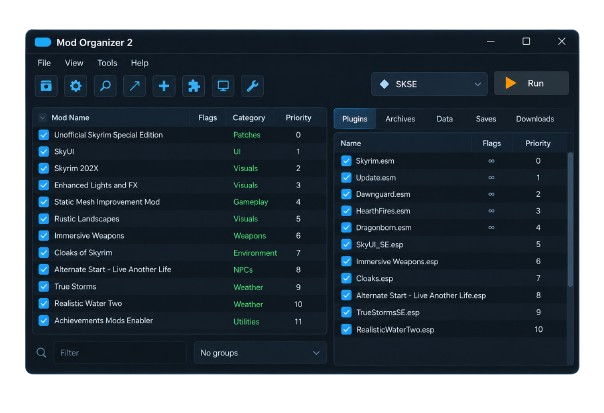
- About Mod Organizer 2
What is Mod Organizer 2?
Mod Organizer 2 is a powerful and flexible mod management tool designed for PC gamers who want better control over their modded games. It allows users to install, organize, enable, disable, and manage mods from one clean interface. This makes it easier to maintain large mod collections, experiment with different setups, and keep everything organized without unnecessary changes to the original game installation.
One of its most useful features is the virtual file system, which keeps mods separate from the actual game files. This helps users test different configurations, manage mod conflicts, switch between multiple profiles, and troubleshoot problems more efficiently. Mod Organizer 2 is especially useful for players who want a cleaner, safer, and more manageable modding experience.
Virtual File System
Keeps mods separate from your original game files for a cleaner and safer setup.
Easy Mod Management
Install, organize, enable, disable, and manage your mods from one simple interface.
Multiple Profiles
Create and switch between different mod setups without changing your main configuration.
- Powerful Features
Everything You Need to Manage Your Mods
Mod Organizer 2 gives you powerful tools to organize mods, manage conflicts, create profiles, and keep your game setup under control.
Virtual File System
Keep your mods separate from the original game installation with Mod Organizer 2’s virtual file system. This helps protect your base game files, makes mod testing cleaner, and allows you to enable or disable content without permanently overwriting important files.
Mod Priority Control
Easily control the order in which your mods load and decide which files should take priority. This makes it much easier to manage large mod collections, avoid unwanted overwrites, and fine-tune your setup without manually moving or replacing game files.
Conflict Management
Mod Organizer 2 helps you identify file conflicts between installed mods so you can understand what is being overwritten. With better visibility into conflicts, you can make smarter decisions, resolve compatibility issues, and keep your modded game more stable and organized.
Multiple Profiles
Create separate profiles for different mod setups, playstyles, or testing environments. Each profile can have its own enabled mods and configuration, allowing you to switch between setups quickly without rebuilding your entire mod list every time you want a different experience.
Plugin Management
Organize and manage your game plugins from one convenient interface. Mod Organizer 2 gives you better control over plugin order and active files, helping you keep complex setups easier to understand, troubleshoot, and maintain as your mod collection continues to grow.
Tool Integration
Launch compatible modding tools directly through Mod Organizer 2 for a smoother workflow. This makes it easier to work with utilities such as load-order tools, editors, script extenders, and other modding software while keeping everything connected to your current mod setup.
- How It Works
How Mod Organizer 2 Works
Mod Organizer 2 makes modding easier by giving you a simple workflow for installing, organizing, testing, and managing mods without directly changing your original game files.
Download & Install
Download Mod Organizer 2, complete the setup, and choose the game you want to manage. Once configured, MO2 creates a separate environment where your mods can be installed and organized without directly modifying the original game installation.
Add Your Mods
Import or install your preferred mods into Mod Organizer 2. Each mod is stored separately, making it easier to enable, disable, update, remove, or organize individual mods without mixing their files with other content.
Organize & Resolve Conflicts
Arrange your mods by priority and review any file conflicts between them. Mod Organizer 2 helps you see which files overwrite others, giving you better control over compatibility and allowing you to fine-tune your mod setup.
Launch & Play
Select your preferred profile, choose the required executable or modding tool, and launch your game through Mod Organizer 2. Your selected mods and settings are applied through the virtual file system while your original game files remain separate.ValiDrive detects this behavior by identifying mismatched or duplicated data patterns, clearly exposing fake storage regions.
- Why Choose MO2
Why Choose Mod Organizer 2?
Mod Organizer 2 gives you a cleaner, safer, and more flexible way to manage game mods. Whether you are testing a few mods or maintaining a large custom setup, MO2 helps you stay organized, troubleshoot problems faster, and keep better control over your complete modding environment.
Safer Modding Setup
Keep mod files separate from core game files, making testing, removing, and replacing mods safer and easier.
Better Performance Control
Manage active mods efficiently, reduce unnecessary load, and maintain a smoother, more organized modded game setup.
Quick Troubleshooting
Disable specific mods and test different combinations to identify compatibility issues, broken content, and unexpected game behavior faster.
Easy Backup & Recovery
Return to stable profiles and configurations quickly after testing changes, without rebuilding your entire mod setup from scratch.
Modding Utility Support
Use compatible modding utilities alongside MO2 while keeping tools, plugins, and configurations organized within one workflow.
Built for Large Mod Lists
Organize large collections of mods, plugins, profiles, and priorities without losing track of your complete custom setup.
- Supported Games
Popular Games Supported by Mod Organizer 2
Mod Organizer 2 supports several popular moddable PC games, especially Bethesda titles. It helps users manage mods, profiles, plugins, and custom setups with a cleaner and more organized workflow.
The Elder Scrolls Games
Mod Organizer 2 is widely used for managing mods in popular Elder Scrolls games, making it easier to organize large mod lists and maintain cleaner setups.
- Skyrim Special Edition
- Skyrim
- Oblivion
- Morrowind
Fallout Series
MO2 also works well with major Fallout titles, helping players manage plugins, load orders, and mod configurations with more control and flexibility.
- Fallout 4
- Fallout: New Vegas
- Fallout 3
- Fallout New California
Modding Environment
Each supported game can be managed in its own organized environment, allowing users to keep profiles, mods, and settings separated for better control.
- Separate Game Instances
- Custom Mod Profiles
- Plugin Management
- Conflict Handling
Workflow Support
Mod Organizer 2 is built to support a smoother modding workflow, making it easier to install, test, update, and manage mods across supported games.
- Easy Mod Installation
- Safer Testing
- Cleaner File Management
- Flexible Setup Control
- Mod Management
Take Full Control of Your Mods
Mod Organizer 2 gives you a clear and organized way to manage every part of your mod setup. From arranging mod priorities to controlling plugins and profiles, you can make changes without creating unnecessary mess inside your game folder. This makes large mod collections easier to manage, test, and maintain.
Mod Priority Management
Arrange mods in the order you want and control which files should take priority when multiple mods affect the same content.
Enable & Disable Mods
Turn individual mods on or off whenever needed without uninstalling them, making testing and troubleshooting much faster.
Conflict Control
Review file overwrites and mod conflicts so you can understand which files are taking priority in your current setup.
Profile Management
Create separate profiles for different playstyles, mod combinations, or testing environments and switch between them easily.
Plugin Control
Manage active plugins and keep your load order easier to review, organize, and maintain from one central interface.
Organized Mod Lists
Use categories, separators, and custom organization to keep large mod collections clean and easier to navigate.
External Tools
Launch and manage your modding utilities directly from MO2.
Use Your Favorite Modding Tools with MO2
Mod Organizer 2 works smoothly with popular modding utilities, allowing you to launch and manage external tools directly through your current mod setup. Keep your workflow connected, organized, and easier to manage while handling advanced modding tasks.
LOOT
Organize and review plugin load order.
xEdit
Inspect, edit, and troubleshoot plugins.
SKSE
Launch Skyrim with script extender support.
BodySlide
Customize compatible character assets.
Creation Kit
Create and edit supported game content.
Nemesis / Pandora
Manage compatible animation workflows.
Mod Organizer 2 vs Manual Mod Installation
Manual mod installation can become difficult to manage as your mod collection grows. Mod Organizer 2 provides a cleaner and more organized approach, giving you better control over mods, profiles, conflicts, plugins, and testing.
A Cleaner Way to Mod
Mod Organizer 2 makes complex mod setups easier to organize, test, and maintain without the constant file management required by manual installation.
- FAQ's
Frequently Asked Questions
Find quick answers to common questions about Mod Organizer 2, including installation, supported games, profiles, mod conflicts, plugins, and everyday mod management.
What is Mod Organizer 2?
Mod Organizer 2 is a mod management tool that helps users install, organize, enable, disable, and manage mods from one structured interface.
Is Mod Organizer 2 free to use?
Yes, Mod Organizer 2 is free and open source, making it accessible to both beginners and experienced modding users.
Does Mod Organizer 2 modify original game files?
MO2 is designed to keep most mod files separate from the base game by using a virtual file system, helping keep the installation cleaner.
What games does Mod Organizer 2 support?
Mod Organizer 2 supports several popular moddable PC games, including Skyrim, Skyrim Special Edition, Fallout 4, Fallout: New Vegas, Fallout 3, and Oblivion.
Can I create multiple profiles in MO2?
Yes, you can create different profiles for separate mod setups, playstyles, testing environments, or character-specific configurations.
How does Mod Organizer 2 handle mod conflicts?
MO2 helps show which mod files overwrite others, allowing you to adjust mod priorities and better control conflicts within your setup.
Can I use external modding tools with MO2?
Yes, compatible utilities such as LOOT, xEdit, SKSE, BodySlide, and other tools can be launched through Mod Organizer 2.
Is Mod Organizer 2 suitable for beginners?
Yes. Beginners can start with basic mod installation and organization, while more advanced features are available as their modding experience grows.
Can I enable or disable mods without uninstalling them?
Yes, installed mods can usually be enabled or disabled directly from the MO2 interface, making testing and troubleshooting much easier.
How do I update Mod Organizer 2?
Download the newer compatible version, review its release information, and follow the recommended update process while keeping important profiles and configurations backed up.
What is the difference between portable and instance mode?
Portable mode keeps the MO2 setup closely tied to one installation, while instance mode allows separate configurations for different games or modding environments.
Why should I use MO2 instead of installing mods manually?
MO2 provides better organization, easier troubleshooting, profile support, conflict visibility, and cleaner mod management compared with manually placing files into the game folder.