
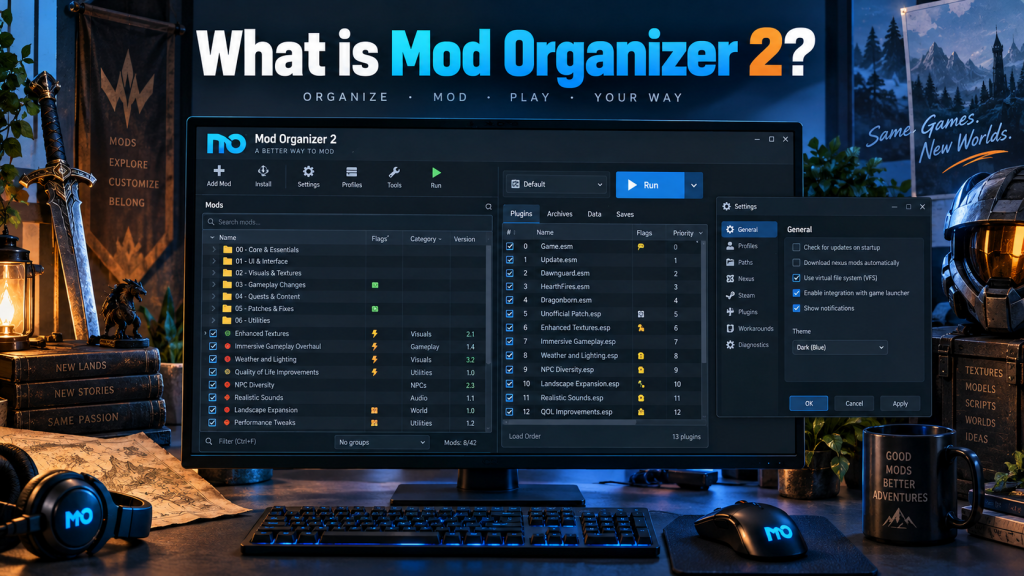
Mod Organizer 2, commonly called MO2, is a powerful mod management tool designed for PC gamers who want better control over game modifications. It provides an organized environment for installing, testing, enabling, disabling, and managing large collections of mods. MO2 was originally developed to support 64-bit games such as Skyrim Special Edition and Fallout 4, while maintaining support for games handled by the original Mod Organizer.
Today, the project continues under active community development.Its biggest advantage comes from keeping mod files separate from original game files. This approach makes experimenting with different modifications much easier while reducing unnecessary changes inside the main game installation.
How Mod Organizer 2 Works
Mod Organizer 2 uses a virtualized mod management system. Instead of permanently placing every installed mod directly into a game’s data folder, MO2 maintains separate mod directories and presents the required files to the game when it launches.
This method gives users greater control over installed content and helps keep the original installation cleaner.
MO2 also makes enabling or disabling individual mods simple. Users can test different combinations without manually copying, replacing, or deleting files every time they want to change their setup.
Main Features of Mod Organizer 2
MO2 includes several useful tools designed to simplify advanced game modification.
- Virtual file management: Keeps mod content separated from original game files.
- Multiple profiles: Allows different mod configurations, saves, and settings for different playthroughs.
- Conflict management: Helps users identify which mods overwrite files belonging to other mods.
- Plugin management: Provides control over active plugins and their organization.
- Integrated tools: External utilities can be launched through MO2 for easier modding workflows.
- Portable installation support: Users can create portable MO2 installations where appropriate.
These capabilities make MO2 particularly useful for players who frequently experiment with large or complicated mod setups.
Games Supported by Mod Organizer 2
Mod Organizer 2 became especially popular within Bethesda game modding communities. Its development originally focused heavily on games such as Skyrim and Fallout.
Support has expanded over time through community development and additional plugins. The project describes MO2 as a mod manager for various PC games, although the quality and depth of support can differ depending on the title.
Commonly associated games include Skyrim Special Edition, Fallout 4, Skyrim VR, Oblivion, Fallout: New Vegas, and other moddable PC titles.
Users should confirm compatibility before building a large mod setup because certain games may have more complete integration than others.
How to Use Mod Organizer 2
Basic MO2 usage becomes easier once users understand its interface and virtual file system.
- Download Mod Organizer 2 from an official source such as its GitHub project or Nexus Mods page.
- Install MO2 and select the game you want to manage.
- Configure the selected game and create a profile if required.
- Download compatible mods from trusted modding sources.
- Install downloaded mod archives through MO2.
- Enable desired mods from the mod list.
- Organize plugins and resolve potential conflicts.
- Launch the game or required modding tools through Mod Organizer 2.
The official MO2 documentation notes that the installer version is generally preferred for easier setup, although portable installations are also possible.
Why Gamers Use Mod Organizer 2
Large mod collections can become difficult to manage manually. One mod may replace textures, scripts, configuration files, or other assets belonging to another modification.
MO2 helps users see these relationships more clearly. Instead of guessing which files were overwritten, users can inspect priorities and modify the order in which mods take precedence.
Profiles also provide significant flexibility. Someone can maintain one configuration focused on graphics while keeping another designed around gameplay changes.
Benefits of Mod Organizer 2
Using MO2 can provide several practical advantages for regular mod users.
- Keeps original game directories cleaner
- Makes individual mods easier to disable
- Supports separate modding profiles
- Simplifies testing different configurations
- Provides better visibility into file conflicts
- Helps organize large mod collections
- Supports integration with useful external modding utilities
These features can save considerable time when troubleshooting or rebuilding a complex game setup.
Mod Organizer 2 Profiles
Profiles are among the most useful MO2 features. They allow users to maintain different configurations without rebuilding everything from the beginning.
For example, one Skyrim profile might contain graphical improvements and visual effects, while another could focus on survival mechanics and gameplay overhauls.
Profiles can make testing easier because changes made for one setup do not necessarily require changing every other configuration.
Mod Conflicts in MO2
Conflicts occur when multiple mods contain files with identical names or locations. One mod must usually take priority over another.
Mod Organizer 2 provides information that helps users understand these overwrites. Changing mod priority can determine which version of a conflicting file becomes available to the game.
However, conflict indicators do not automatically mean something is wrong. Some mods are intentionally designed to overwrite files from another mod.
Reading each mod author’s installation instructions remains important.
Is Mod Organizer 2 Beginner-Friendly?
MO2 has a more technical interface than some simpler mod managers. Beginners may need time to understand concepts such as profiles, priorities, plugins, virtual files, and conflict resolution.
Its official documentation itself acknowledges that starting with MO2 can feel intimidating and recommends learning its major features before jumping deeply into modding.
Once users understand the basic workflow, however, its detailed controls can make complicated mod installations much easier to maintain.
Is Mod Organizer 2 Free?
Mod Organizer 2 is an open-source community project. Its GitHub repositories remain publicly available, and active development is handled by the Mod Organizer 2 development team.
Users should obtain MO2 from recognized sources rather than unknown third-party download websites. Official sources reduce the risk of downloading modified, outdated, or potentially unsafe packages.
Mod Organizer 2 vs Manual Mod Installation
Manual modding typically requires users to copy files directly into game directories. Removing those modifications later can become difficult because users might not remember which files belonged to which mod.
MO2 provides separation between mod files and the original installation. That structure makes enabling, disabling, updating, and troubleshooting modifications significantly more manageable.
Manual installation may still work for simple situations, but MO2 becomes particularly valuable when dozens or hundreds of modifications are involved.
Who Should Use Mod Organizer 2?
Mod Organizer 2 is well suited to PC gamers who frequently install mods, experiment with different configurations, maintain multiple playthroughs, or troubleshoot complicated mod conflicts.
Casual users running only one or two simple modifications may not need all its advanced capabilities. Players building extensive mod collections, however, can benefit considerably from its organizational tools.
Conclusion
Mod Organizer 2 is a flexible mod management application built to give PC gamers greater control over complex game modifications. Its virtualized file management, profiles, conflict visibility, plugin organization, and external-tool integration make it particularly valuable for serious modding.
Although beginners may face a learning curve, understanding MO2 can make long-term mod management cleaner and more organized. For players who frequently experiment with Skyrim, Fallout, and other supported PC games, Mod Organizer 2 provides a practical way to manage modifications without constantly changing original game files.
Pingback: How Do I Download Mod Organizer 2?