
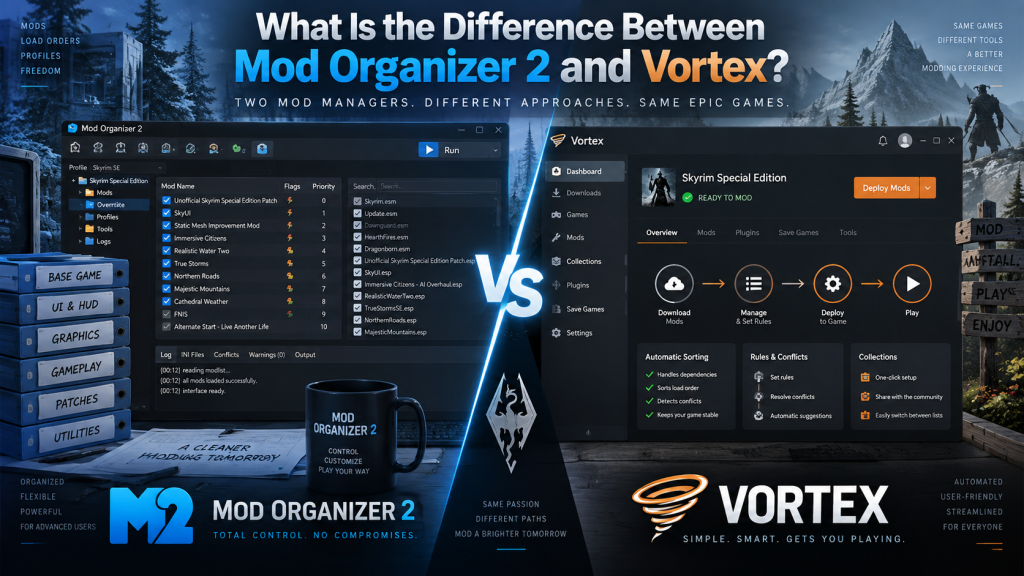
Choosing the right mod manager can make a major difference when installing, organizing, updating, and troubleshooting game modifications. Mod Organizer 2 (MO2) and Vortex are two popular options used by PC gamers, especially players who enjoy heavily modded Bethesda titles. Both programs help users manage mods without relying on complicated manual installation methods.
Although their basic purpose is similar, Mod Organizer 2 and Vortex take different approaches to file management, conflict resolution, user control, and game support. MO2 focuses heavily on advanced control and file isolation, while Vortex emphasizes automation, accessibility, and broad multi-game compatibility. Understanding these differences can help players choose the manager that better matches their experience and modding needs.
Read More: Can Mod Organizer 2 Manage Skyrim Mods?
What Is Mod Organizer 2?
Mod Organizer 2 is an open-source mod management program designed primarily for games such as Skyrim, Fallout 4, Fallout: New Vegas, Oblivion, and other Bethesda titles. Its most important feature is mod isolation. Instead of placing mod files directly inside the game’s Data directory, MO2 keeps individual mods in separate folders and creates a virtual file system when the game launches.
This approach provides users with detailed control over which files take priority when multiple mods modify the same content. MO2 also supports profiles, drag-and-drop mod priority management, Nexus Mods integration, conflict inspection, multiple game instances, and external modding tools. These capabilities make it particularly attractive to experienced users creating large or complicated mod lists.
- Keeps individual mods isolated from each other
- Provides detailed mod priority control
- Supports separate profiles and configurations
- Shows file conflicts clearly
- Integrates with Nexus Mods downloads
What Is Vortex?
Vortex is the official modern mod manager developed by Nexus Mods. It was created to make installing and managing mods easier for beginners while still offering useful features for experienced users. Nexus Mods currently describes Vortex as supporting more than 500 games, giving it much broader game coverage than MO2.
Vortex integrates closely with the Nexus Mods website, allowing users to download, install, update, enable, and organize mods through a unified interface. It also includes automatic load-order management, mod profiles, conflict rules, extensions, and tools for managing downloads and plugins. Its focus on automation reduces the amount of manual configuration required for everyday modding.
- Supports hundreds of moddable games
- Offers strong Nexus Mods integration
- Includes automatic load-order management
- Provides profiles for different mod setups
- Supports extensions and community plugins
Mod Organizer 2 vs Vortex: File Management
The biggest technical difference between Mod Organizer 2 and Vortex involves how they handle installed files. MO2 stores every mod separately and uses its virtual file system to present the selected files to the game. Because files are not normally copied directly into the game’s Data folder, users can change mod priorities or remove mods without permanently overwriting files belonging to another mod.
Vortex typically uses a staging folder combined with a deployment system. Its standard deployment method commonly uses hard links, making mod files appear within the game folder while avoiding unnecessary duplicate storage. Users install mods into Vortex’s staging system and then deploy them to the game according to their selected rules and priorities.
Which Mod Manager Is Easier to Use?
Vortex is generally easier for beginners because many important tasks are automated. Its interface guides users through discovering games, downloading mods, resolving common conflicts, and organizing plugins. Automatic sorting can reduce the amount of technical knowledge required when building a relatively straightforward mod setup. Nexus Mods specifically positions Vortex as a tool designed to simplify modding while retaining advanced options.
Mod Organizer 2 can require more learning because users are given greater direct control over priorities, conflicts, executables, profiles, and virtual files. Beginners may initially find its left and right panels confusing, but experienced modders often appreciate seeing exactly how their configuration works. Once users understand its interface, managing complicated setups can become highly organized and predictable.
Conflict Resolution Differences
Mod conflicts occur when two or more modifications contain files that affect the same part of a game. MO2 makes these interactions highly visible. Users can inspect individual conflicting files and adjust mod priority by moving mods within the installation order. This makes it relatively easy to determine exactly which mod should overwrite another.
Vortex approaches conflicts through a rules-based system. Users can establish relationships telling Vortex which mod should load before or after another conflicting mod. This method can be convenient because Vortex remembers these relationships and manages deployment accordingly, although users accustomed to manually arranging an ordered mod list may initially prefer MO2’s more direct approach.
- MO2 emphasizes manual priority and detailed file inspection
- Vortex uses conflict rules and automated deployment
- Both can manage complex mod conflicts
- MO2 offers greater visibility for advanced troubleshooting
- Vortex often requires fewer manual adjustments
Game Support
Game support is another major difference between Mod Organizer 2 and Vortex. MO2 is particularly well known within Bethesda modding communities and officially lists support for titles including Morrowind, Oblivion, Fallout 3, Fallout: New Vegas, Skyrim, Skyrim Special Edition, Skyrim VR, Fallout 4, and Fallout 4 VR.
Vortex has a much wider focus. Nexus Mods currently states that Vortex supports more than 500 games, covering everything from Bethesda RPGs to titles such as Cyberpunk 2077, Stardew Valley, Baldur’s Gate 3, Elden Ring, and many others. Players who frequently mod different games may therefore find Vortex more convenient.
Profiles and Multiple Mod Setups
Both Mod Organizer 2 and Vortex support profiles, allowing users to maintain different collections of enabled mods for different playthroughs. MO2 profiles can be especially useful for keeping experimental setups separate from stable configurations. Users can switch between profiles without reinstalling every mod because installed modifications remain available as a common pool.
Vortex also lets players create independent mod profiles containing different combinations of active mods. This is helpful when one character needs a lightweight setup while another uses a heavily customized configuration. Nexus Mods describes profiles as a way to switch between different combinations of mods for particular playthroughs.
Nexus Mods Integration
Both applications work with Nexus Mods, but Vortex provides the more tightly integrated experience because it is developed by Nexus Mods itself. Users can access downloads, mod updates, collections, and other Nexus-related features through a workflow designed specifically around the platform. One-click installation also makes adding supported mods convenient.
MO2 also provides Nexus integration, including direct downloads and mod installation. However, its overall design emphasizes managing the resulting files rather than creating an all-in-one Nexus ecosystem. Users who spend significant time manually organizing large Skyrim or Fallout installations may prefer this approach, while casual Nexus users may appreciate Vortex’s streamlined workflow.
Which Is Better for Skyrim and Fallout Modding?
For heavily modded Skyrim or Fallout installations, Mod Organizer 2 is often attractive because its isolated file structure and transparent priority system provide extensive control. Users working with hundreds of mods, compatibility patches, script extenders, texture replacements, and external utilities can inspect their setup in considerable detail without permanently mixing mod files together.
Vortex remains fully capable of managing major Bethesda games and can be an excellent choice for users who prefer automation. Its conflict rules, plugin tools, profiles, and deployment system are powerful enough for substantial mod lists. Therefore, the better option depends less on whether a manager can handle Skyrim and more on how much direct control the player wants.
Mod Organizer 2 or Vortex: Which Should You Choose?
Choose Mod Organizer 2 if you prefer detailed control, transparent conflict information, manual priority management, and strong isolation between installed mods. It is particularly suitable for enthusiasts who frequently troubleshoot complicated Bethesda mod lists or want to understand exactly how individual files interact inside their setup.
Choose Vortex if you value simple installation, broader game support, automatic management, and close integration with Nexus Mods. Neither manager is universally superior. MO2 provides a more hands-on workflow, while Vortex aims to automate many technical tasks. Your preferred games, experience level, and willingness to manually manage conflicts should determine the better choice.
Conclusion
The main difference between Mod Organizer 2 and Vortex is their philosophy. Mod Organizer 2 gives users detailed manual control through isolated mod directories and a virtual file system. Vortex combines staging and deployment with automation, conflict rules, Nexus integration, and extensive support for many different games.
For advanced Bethesda modders, MO2 can provide exceptional flexibility and troubleshooting control. For beginners or gamers who modify many different titles, Vortex offers a convenient and approachable solution. Both are powerful tools, and either can create stable modded setups when mods, dependencies, conflicts, and load orders are managed carefully.
Pingback: How Do I Update Mod Organizer 2?